From Viral Toy to Serious Music Production Powerhouse?
The world of AI music has moved incredibly fast. Just two years ago, generating a song with AI felt like a clever party trick—something that sounded “okay” but was clearly synthetic. Fast forward to 2026, and the conversation has changed. With the release of Suno v5 and the launch of their integrated “Studio” environment, Suno is no longer just for making meme songs about your cat. It is a legitimate contender in the music production space.
But as the technology has matured, so has the complexity surrounding it. Between high-stakes lawsuits with major record labels and the rise of fierce competitors like Udio and Google’s Lyria, choosing the right tool is harder than ever. Is Suno still the best choice for creators, or has it become a “walled garden” for corporate-approved sounds? Let’s get into the details.
The 2026 Quick Verdict
Suno AI remains the most intuitive and “human-sounding” music generator on the market today. Its strength lies in its vocal realism and ability to structure a full song (verse, chorus, bridge) with zero musical knowledge. For YouTubers, social media managers, and hobbyists, it is the gold standard. However, professional producers may prefer the higher instrumental fidelity of Udio, and everyone should be aware of the new ownership rules following Suno’s 2025 legal settlements.
What Exactly is Suno AI?
At its core, Suno AI is a generative audio platform. You type a prompt, and it gives you a song. But in 2026, “giving you a song” means something much more sophisticated than it did in the early days.
Suno now operates on a hybrid diffusion and transformer architecture (v5 and v5 Turbo models) that doesn’t just “guess” the next note; it understands musical structure. When you ask for a “90s Grunge track about a rainy day in Seattle,” the AI knows to include a gritty guitar tone, a specific vocal fry, and a dynamic shift between the quiet verse and the loud chorus.
While many tools focus only on instrumentals, Suno’s “secret sauce” has always been its vocals. In 2026, the “metallic” artifacts that used to plague AI singing have been largely suppressed, making it difficult for the average listener to distinguish a Suno track from a human demo.
Key Features That Define Suno in 2026
If you haven’t checked Suno in a few months, you might miss some of the most powerful updates that have moved it beyond a simple text-to-speech engine for music.
1. The Suno Studio (Generative DAW)
This is the biggest shift in 2026. Suno moved away from being just a website where you press “Generate.” Suno Studio is essentially a lightweight Digital Audio Workstation (DAW) in your browser. It allows you to:
Generate by section: You can create just an intro, then “extend” it into a verse, then a chorus.
Multitrack Editing: You can see your song on a timeline, move blocks around, and even swap out specific instruments using AI “inpainting.”
Audio-to-Audio Remixing: You can upload a recording of yourself humming a melody, and Suno will turn that hum into a professional cello solo or a pop vocal.
2. Stem Export (The Producer’s Dream)
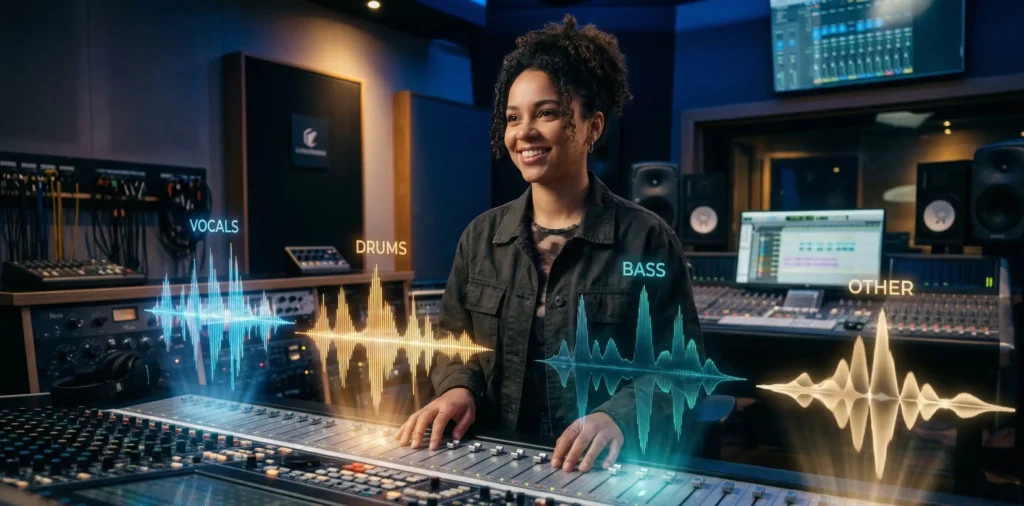
For a long time, the biggest complaint from real musicians was: “I love the song, but the drums are too loud.” In the 2026 Premier plan, Suno finally solved this. You can now export stems. This means you get four or more separate high-quality WAV files:
Vocals (Clean and isolated)
Drums
Bass
Other (Melodic instruments)
This feature alone makes Suno a viable “idea generator” for professional producers who want to take AI-generated vocals and mix them in professional software like Ableton or Logic Pro.
3. Consistent “Personas”
Imagine finding the perfect AI singer for your brand, but every time you generate a new song, the voice sounds slightly different. Suno’s Personas feature allows you to “save” a specific vocal character. You can give your AI singer a name, a back-story, and a consistent tone, ensuring that your 10th song sounds like the same artist as your 1st.
Audio Quality: Is it “Radio Ready”?
We need to be honest here: AI music is not 100% perfect yet. While Suno v5 generates audio at 44.1kHz stereo (CD quality), there is still a specific “compression” feel to some tracks, especially in very dense genres like Heavy Metal or Orchestral scores.
The Good: Acoustic pop, folk, country, and lo-fi hip-hop sound nearly flawless. The “space” between the instruments is clear, and the vocals are crisp.
The Bad: Fast-paced rap and high-energy EDM can sometimes feel “mushy.” The AI struggles to keep the percussion perfectly sharp when there are too many competing frequencies.
However, for background music in a YouTube video or a catchy jingle for a TikTok ad, the quality is far beyond what 99% of your audience will notice.

Comparison: Suno vs. The Competition (2026)
To understand where Suno sits, you have to look at the other big players in the room. Each of these tools has a specific “vibe” and target user.
| Feature | Suno AI | Udio | Boomy | Soundraw |
| Best For | Full songs with vocals | High-fidelity instrumentals | Fast, simple background beats | Content creators needing loops |
| Vocal Quality | 10/10 (Most human) | 8/10 (Often mumbles) | 2/10 (Limited) | N/A (Instrumental focus) |
| Control | High (Studio Mode) | Very High (Pro focused) | Low (One-click) | Medium (Slider based) |
| Speed | Under 60 seconds | 90+ seconds | Instant | 20 seconds |
| Legal Status | WMG Settlement (Safe) | Ongoing legal shifts | Distribution focused | Royalty-free |
Suno vs. Udio: The Great Rivalry
In 2026, the “Suno vs Udio” debate is like “iPhone vs Android.”
Choose Suno if you want the song to be “done” quickly and you need vocals that carry real emotion.
Choose Udio if you are a music nerd who wants to spend 2 hours perfecting a jazz fusion track. Udio’s instrumentals are often “cleaner,” but their workflow is slower and more fragmented.
Pricing and Credits: The Real Cost
Suno uses a credit-based system. Each generation (which gives you two variations) costs 10 credits.
- Free Plan ($0): 50 credits/day. You can make 10 songs, but you do not own them. You cannot upload these to Spotify or monetize them on YouTube.
- Pro Plan (~$10/mo): 2,500 credits. This is the “Sweet Spot.” You get commercial rights and can generate about 500 songs a month.
- Premier Plan (~$30/mo): 10,000 credits. This is for power users and agencies. It unlocks Suno Studio and Stem Exports, which are essential if you plan to do any professional post-production.
Pro-Tip: Credits do not roll over. If you don’t use them by the end of your billing cycle, they are gone. Don’t hoard them—experiment!
The Legal Side: Do You Really “Own” the Song?
This is where things got complicated in 2025 and 2026. Following a major settlement with Warner Music Group, Suno changed its Terms of Service.
Commercial Use: If you are a Pro or Premier subscriber, Suno grants you a license to use the music for commercial purposes (Spotify, Ads, YouTube monetization).
The “Ownership” Catch: Under current 2026 law, you generally cannot copyright a raw AI-generated file. This means if someone “steals” your Suno song and puts it in their own video, it is very difficult to sue them for copyright infringement because there was no “human author.”
The Solution: Use the Stem Export feature. If you take the stems into a DAW, add your own guitar part, or remix the vocals significantly, you are adding “human authorship,” which makes the song much more legally defensible.
Step-by-Step: How to Make a Great Song on Suno
To get the most out of your credits, don’t just type “Happy song.” Follow this 2026 “Power User” workflow:
Switch to Custom Mode: Avoid the “Simple” box. Custom Mode allows you to separate your style prompts from your lyrics.
Use Structure Tags: Inside your lyrics, use brackets like
[Verse],[Chorus],[Bridge], and[Outro]. This tells the AI exactly when to change the energy.Define the Vocalist: Instead of “female singer,” try “Breathy, soulful female vocals with a hint of 70s reverb.”
Extend, Don’t Restart: If you like the first 60 seconds of a song but the ending is bad, don’t start over. Use the Extend button to keep the same voice and style while generating a new ending.
Who is Suno AI Best For?
Content Creators: If you need unique, high-quality background music for a YouTube channel without worrying about Content ID strikes, Suno is a lifesaver.
Small Business Owners: Create your own “brand anthem” or jingles for local radio and social ads for the cost of a few cups of coffee.
Aspiring Songwriters: Use Suno to hear how your lyrics sound “in action.” It’s the ultimate tool for overcoming writer’s block.
Agencies: Quickly prototype 10 different directions for a client project before hiring a human composer to finish the winner.
Final Verdict: Is Suno AI Worth It?
Suno AI is no longer a gimmick. In 2026, it is a formidable tool that has lowered the barrier to entry for music creation to near zero.
It isn’t perfect—the legal landscape is still a bit of a “Wild West,” and the audio quality can sometimes feel a bit “digitally processed.” However, for the sheer speed of going from an idea to a full, emotional song, Suno has no equal. If you are serious about incorporating AI music into your workflow or content, the Pro Plan is one of the best investments you can make this year.
FAQ (Frequently Asked Questions)
Can I put Suno songs on Spotify?
Yes, provided you have a paid subscription (Pro or Premier) at the time the song was created. You should also disclose that the track is “AI-Assisted” to comply with 2026 distribution guidelines.
Does Suno support other languages?
Absolutely. Suno v5 is remarkably good at Mandarin, Spanish, Hindi, French, and even niche regional dialects. It maintains the correct phonetic accents for almost every major language.
Is my music safe from being “taken down”?
Because Suno has signed licensing deals with major labels like Warner, the risk of “mass takedowns” for using the platform has drastically decreased compared to 2024. However, avoid “deepfaking” (trying to sound exactly like a specific famous artist), as that can still trigger manual takedowns.
Can I use my own lyrics?
Yes, and you should! Using your own lyrics is one of the best ways to ensure your song feels original and avoids common AI clichés.
This review reflects hands-on testing and publicly available information as of early 2026. Pricing and features may change. Always verify current details on the official Suno website before purchasing.